
Building Data Apps In Claude Part 2: Capturing Business Context & Scoping Projects
Stop burning tokens building stuff nobody cares about.

Claude Opus 4.6 took an old problem in data and made it really acute; we are often very bad at delivering the things users actually need. It’s always been easy to get hung up displaying technical wizardry and crushing tickets without pausing to ask, ‘Does anyone actually want what I’m building right now?’ In my early career I once burned months delivering a perfectly designed OLAP analytics project that was met with a shrug and promptly abandoned. It stung, badly.
Thank you to MotherDuck for sponsoring this post - stick around at the end for an example data app I built riduckulously fast with Claude and MotherDuck Dives.
Thanks to Claude, I would not have wasted months building that system - I could have delivered it in days! Unfortunately, without a proper grounding in the actual needs of the business it would have been just as useless. Today the risk of spamming users with AI authored data slop is real; high velocity garbage is still garbage, just faster.
In this article I will introduce you to the product thinking mindset that helps you determine what to build and the practical steps to capture business context that Claude needs to build analytics. Using these techniques, I built a complete pipeline, warehouse and dashboard solution in an hour. Don’t skip to the practical stuff - no amount of AI skills will save you if you’re building the wrong thing.
Product basics for data nerds
Product thinking is not new, but it is relatively new to data. I first encountered it in Dan Olsen’s The Lean Product Playbook and it completely changed the way I think about analytics development forever. There are great resources if you want to go deep on product thinking in data - Anna Bergevin’s Substack is a must read.
Start with value
The number one sin of the data developer is building before you know what the point of your app is. If you can’t articulate it, neither can Claude. That means identifying the theory of value your app delivers before you do anything.
Great debates have raged about what value means in data. Malcolm Hawker shared my favorite definition on an episode of the Super Data Brothers show:
Increased revenue, decreased cost, reduced risk. You could hair split a little bit, but those are the three buckets of value that our customers care about, and we need to demonstrate and quantify how our data drives one of those three things.
It sounds simple; it isn’t. Getting users to articulate how data will help with these three pillars of value is a real challenge, one we’ll return to later in this post. Identifying up front exactly how you plan on pulling one or more of these levers, and providing it to Claude, becomes the north star for all development.
Work backwards
I have heard ‘We need to sort out our data foundations before we can even think about building apps for users’ so many times in my career. It has the gloss of wisdom, but it’s exactly backwards. Value flows from user needs, not from data itself.
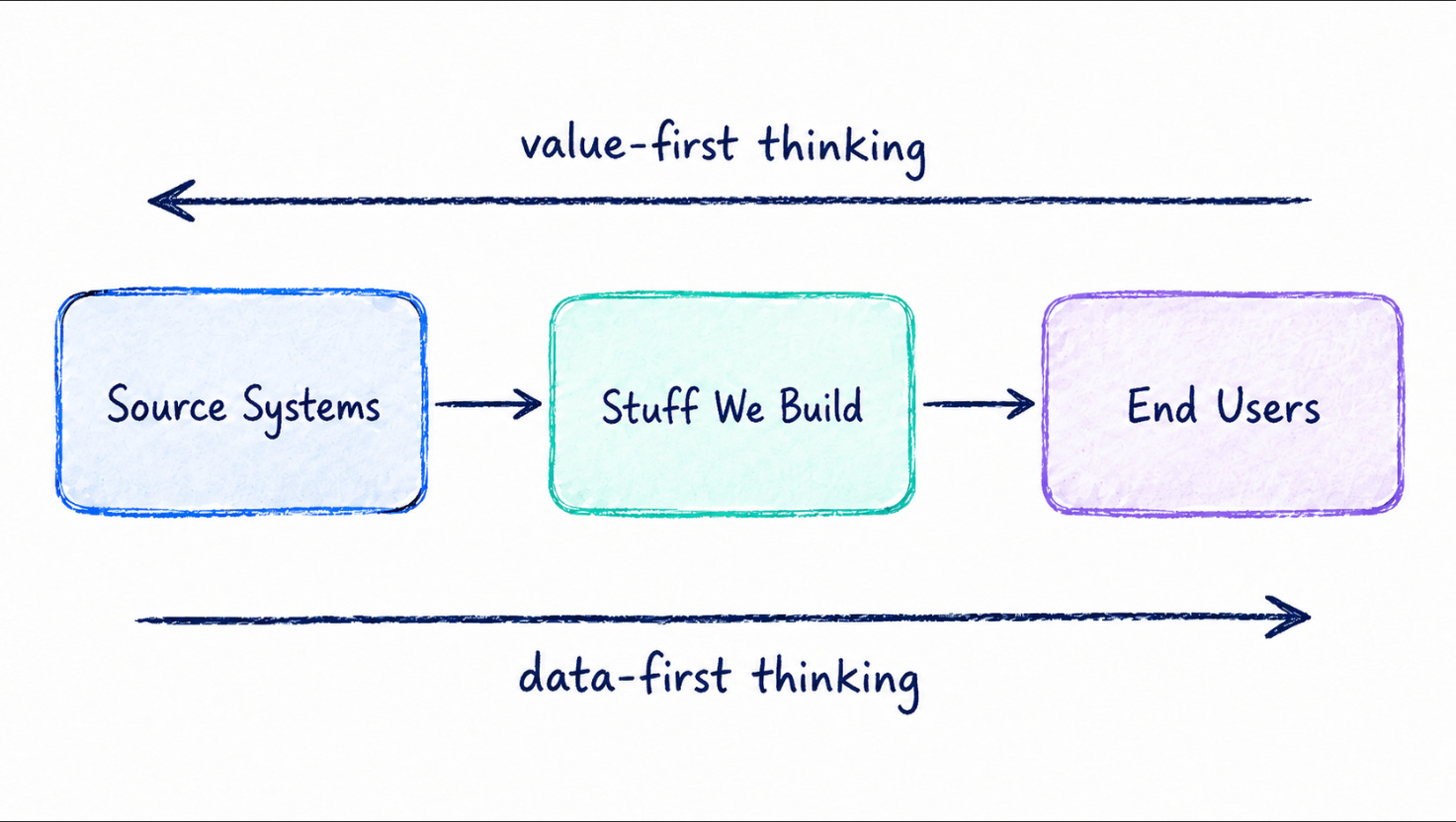
Design the surfaces that deliver value first - the dashboard, chatbot, API, app, whatever. These points of contact with human beings are the place your project lives or dies. This doesn’t mean the data and its infrastructure are unimportant - they’re critical. But recognize that you can’t even tell what data matters until you know who it matters for and why.
Build Small
‘Don’t boil the ocean’ is hard won advice in our field. It takes on new meaning working with Claude. Claude’s default behavior is to go absolutely fucking nuts building out insanely complex architectures when simple ones will do. If you’ve never seen nine nested CTEs where a select * works just as well, now is your chance! You need to explicitly tell it not to in the project context (covered here). Small architectural units yield clean, understandable designs and easy to build outputs.
Deliver Fast, Learn Fast
Building in digestible, deliverable chunks makes collecting user feedback much easier, dramatically raising your chances of avoiding a data slop avalanche. The gap between what users say they need and what they actually need to realize the project’s theory of value is often huge. But here’s the truth; users don’t know what they want until you give them what they asked for. Give it to them fast.
Turning Claude Into A Product Person
Let’s get practical and show how to apply the mindset so Claude helps you ship value over slop.
Tell Claude how you want to work
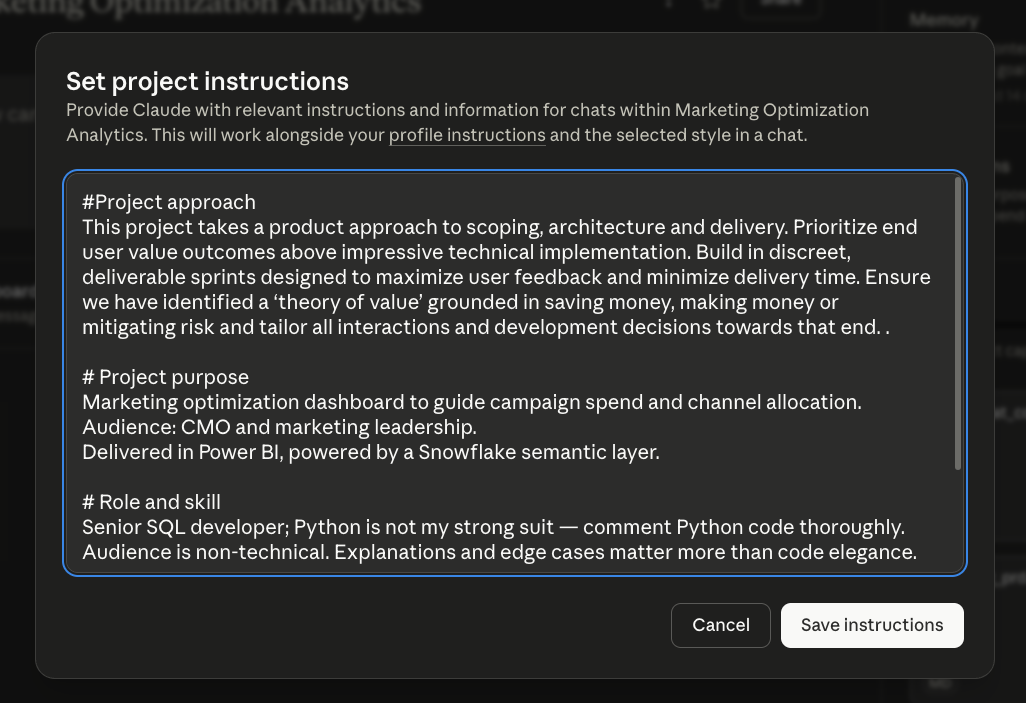
The whole mindset I outlined above needs to be explicitly defined to Claude in your project instructions. Type something like this:
This project takes a product approach to scoping, architecture and delivery. Prioritize end user value outcomes above impressive technical implementation. Build in discrete, deliverable sprints designed to maximize user feedback and minimize delivery time. Ensure we have identified a ‘theory of value’ grounded in saving money, making money or mitigating risk and tailor all interactions and development decisions towards that end.
Here it is in the Claude Web UI. Add it to your claude.md if you’re a code user. This establishes the way you want Claude to behave as you scope.
Brain dump what you think you know
You almost always walk into the first project meeting having some idea what a good outcome looks like - maybe you’ve worked with these users before, maybe you know their data or industry especially well. Maybe you don’t, but you’ve got intuition. No matter the scenario, brain dump your stream of consciousness ideas directly into Claude. Don’t worry about consistency, formatting or even logic. Just get it all out. Trust me, it’s cathartic.
Here’s the crucial thing to remember: At this stage we aren’t thinking much about technical implementation! Instead, we’re capturing things like:
What value might be delivered from the project?
What distinct user communities exist? How are they similar or different?
What people, personalities or politics could drive success for the project?
What standard industry metrics, approaches and outcomes might the project seek to deliver?
What similar engagements have you done in the past and what made them successful or not?
At a high level, what data might be useful? What metrics?
At a high level, what front-end might be useful?
We aren’t getting into ERDs, DAGs, SQL, or JSONs. We need to get the theory of value and the story of how we deliver that value correct before we move onto implementation.
Once you have it all out, tell Claude:
Here is what I think I know about this project. Help me structure my thinking and prepare to meet with the project users and sponsors. What makes sense about what I’ve written and what doesn’t? What are my potential blind spots? What can I learn before the meeting to be prepared to identify the theory of value of this project and how to best deliver it? Give me output as both a pdf and a structured markdown file for storing in your context.
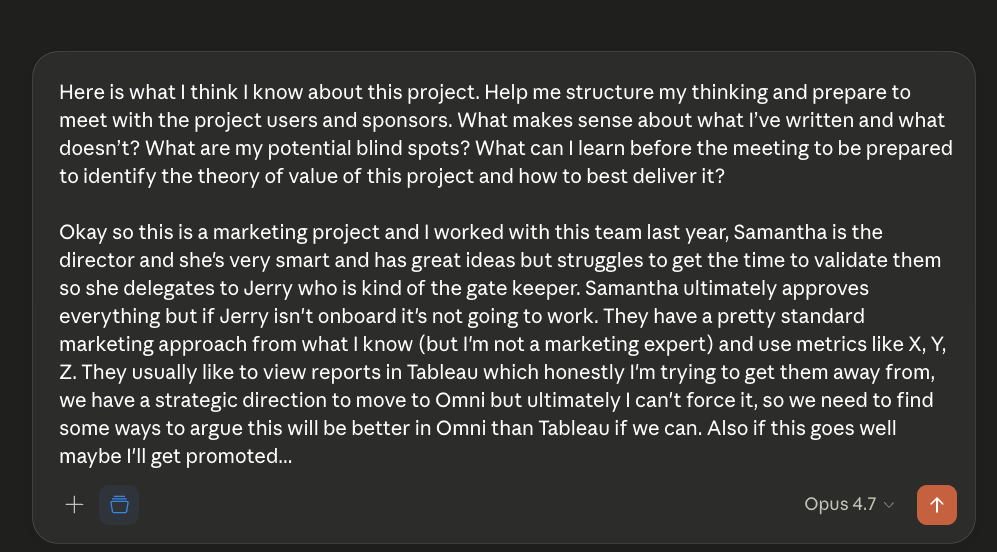
Take the time to iterate with Claude in a session. It’s worth it. And notice that last bit - it’s helpful to have Claude produce human readable AND markdown versions, one for you, one for Claude.
When you’ve gone back and forth and feel confident that you’ve explored the problem space as you understand it today, ask Claude:
Produce a structured briefing book in advance of my meeting with these users. Pay special attention to the assumptions I’ve made that I need to confirm before designing this project. Help me understand the social and political dynamics to best relate to my stakeholders. Call out any ambiguities or weaknesses in my understanding, and prepare a list of the top questions I need answers to by the end of the meeting.
Think of this output as your battle plan going into the first stakeholder meeting.
Meet with your users and record it
You’re walking into your first project meeting outrageously prepared, which is great! The goal of this meeting isn’t to show how smart you are and how much homework you’ve done, it’s to deeply probe your assumptions about value delivery to discover all the ways in which you’re wrong. Remember, users often don’t know what they want; they need something to react to.
Come in with an open mind. Listen to how they articulate their problems and what solutions they think might solve them. Refer back to your prep work and ensure you get your pressing questions answered. Most importantly, don’t start solutioning immediately in the meeting. This is a fact finding mission.
Record the meeting if you can. This transcript is incredible for Claude; drop it directly into project context and let it inform all subsequent work.
Build a Product Requirements Document
A product requirements document (PRD) defines a product’s purpose, features, functionality and behavior before it gets built. They can be very complex for software products; for analytics apps developed by Claude, keep it to a high level and save specific technical implementation or architectural information for later.
The PRD I use captures seven key areas to consider when developing an analytics project in Claude. This list is not exhaustive - customize to your environment and needs.
Value statement: Qualitative and quantitative statements of measurable impact.
Personas: Specific humans with specific needs who will use what you build. They should represent a type of user.
Features & Functionality: MVP features to deliver that test the value statement. Again, these are high level. If the dashboard has filters, just say that. No need to list every one.
Technical Requirements: Technologies to use, data sources to pull, etc. Did I mention high level?
Constraints and Risks: Hard business or cultural constraints, known risks.
Success Metrics: Measurements that confirm the identified value was delivered.
Key Business Terms: Terms where your organization’s definition differs from common usage.
It helps to establish a standard format to ensure consistency across projects. You can drop this list in to Claude and ask it to build a template.
To fill out product requirements document, start a new chat with Claude and submit a prompt something like this:
I need to prepare a product requirements document for this project. I have a PRD template, my own structured thoughts, notes from the meeting with stakeholders, and the meeting transcript for you to use. Iterate through each section with me, asking questions to fill it in. Be skeptical and push back when necessary. Our goal is to identify the right value statement, then design a product that delivers. When we’re finished, deliver the output as a sharable formatted PDF and a markdown file for use in your context.
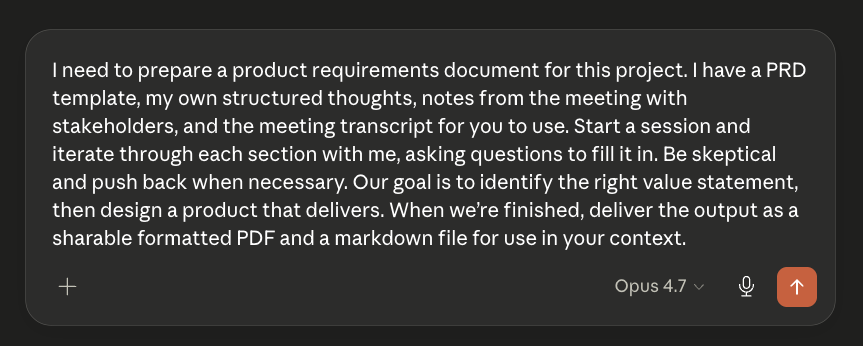
The PRD is traditionally the last step before designing the technical architecture; before Claude we’d jump right in. But because Claude makes development so much faster, there’s one final step before starting the serious technical work.
Build a front end prototype
Two things you should never forget from this article: ‘Users don’t know what they want until you give them what they asked for’ and ‘Design the surfaces that deliver value first.’
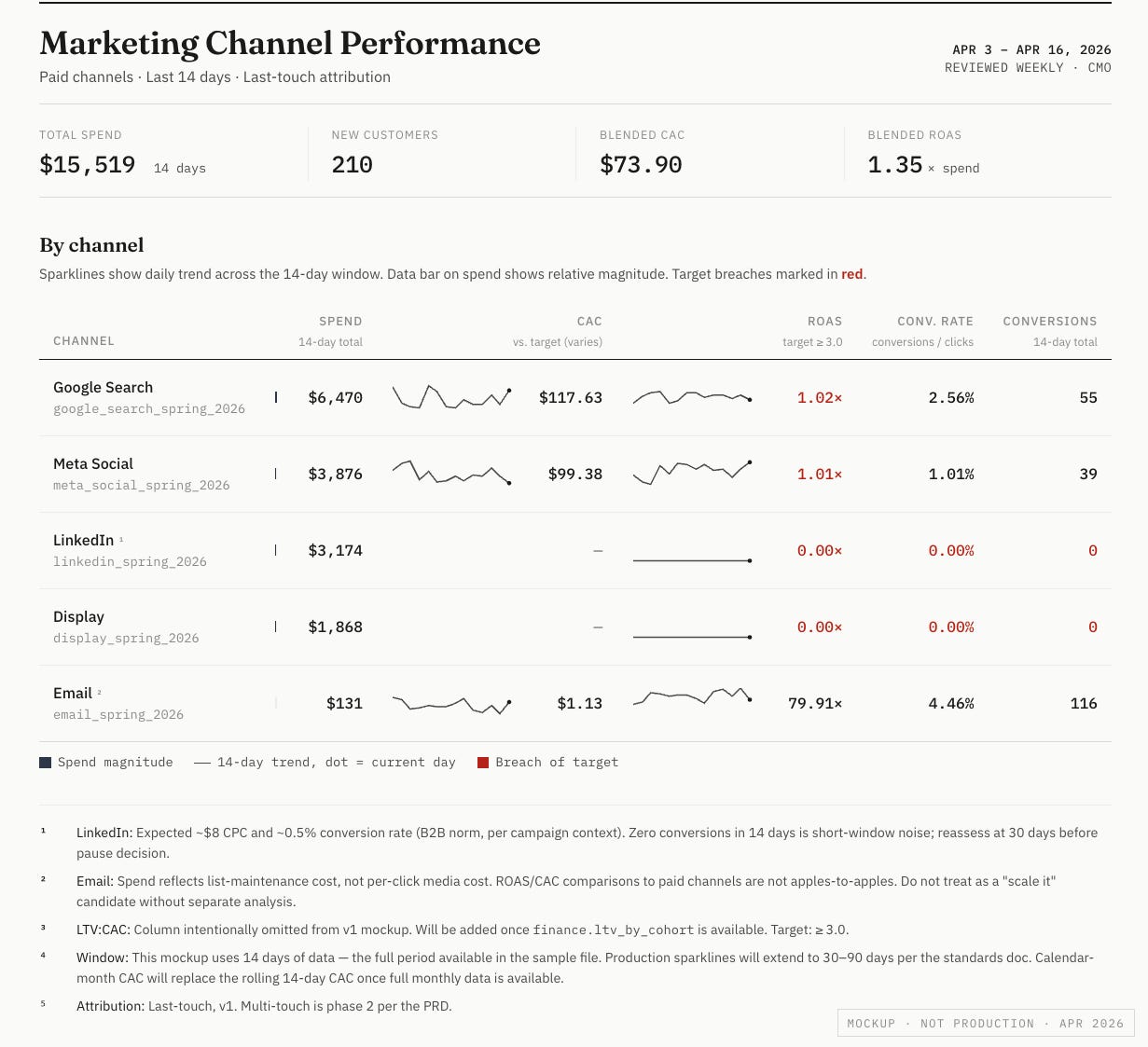
With that in mind, take your PRD and quickly build a prototype of the human contact points of the project for feedback. Because users often get hung up when numbers don’t match their spreadsheets, consider sourcing the data from their spreadsheets.
Much of what you hear will concern visual design. This is valuable feedback, but encourage the users to focus more closely on whether or not the prototype delivers the value they expect. Prod them for what obviously won’t work now that they see it - that’s a dead end you found quickly.
This type of thing would take days or weeks in the past; with Claude it takes minutes or hours. I built a complete pipeline, data warehouse and operational dashboard in Claude in under an hour. With the right context this dashboard was a one-shot prompt.
Build a dashboard I can use to collect feedback from my users, based on the PRD. Render it in the style of Stephen Few.
Repeat the PRD creation process with this second round of feedback.
What Claude Can’t Do (Yet)
You probably noticed what we didn’t ask Claude to do - any project management work. Claude is terrible at estimating time. Without the ability to say ‘this task should take 8 hours’ it’s hard to build a reliable project plan, design a gantt chart or pick a project deliverable date. It can assist you in all those things, but it can’t one-shot them with good context like it can a dashboard.
At this point you’ve done deep thinking on the problem, met with end users, designed a PRD, delivered a prototype and solicited a first round of feedback. Most importantly, you’ve developed a theory of value and have agreement on the broad scope of how to deliver it.
For personal projects or very simple deliverables, you’re ready to work. But in an enterprise context with many stakeholders, complex systems, office politics, regulatory requirements, legacy code, data steward reviews, and all the rest, you can’t rely on AI to build autonomously without an architecture plan in place that gives prescriptive instructions on what and what not to build. AI will create an HTML dashboard; your enterprise standard in Power BI. That’s a problem.
The next article in the series covers two things: Designing technical architectures with Claude that you can actually deploy, and identifying when and how to use AI as a component of those architectures that unlocks powerful new capabilities without destroying security or burning 10k on tokens to answer ‘What were sales last week.’
MotherDuck Dives: Claude Analytics Apps On Easy Mode
The claim ‘I built a complete pipeline, warehouse and dashboard in an hour’ requires some proof. Here’s an example of a complete financial briefing book built using Claude and MotherDuck Dives. Pick any Dow 30 company and get the full picture - income statement, balance sheet, cash flow, equity - all rendered instantly in your browser. Check it out for yourself here.
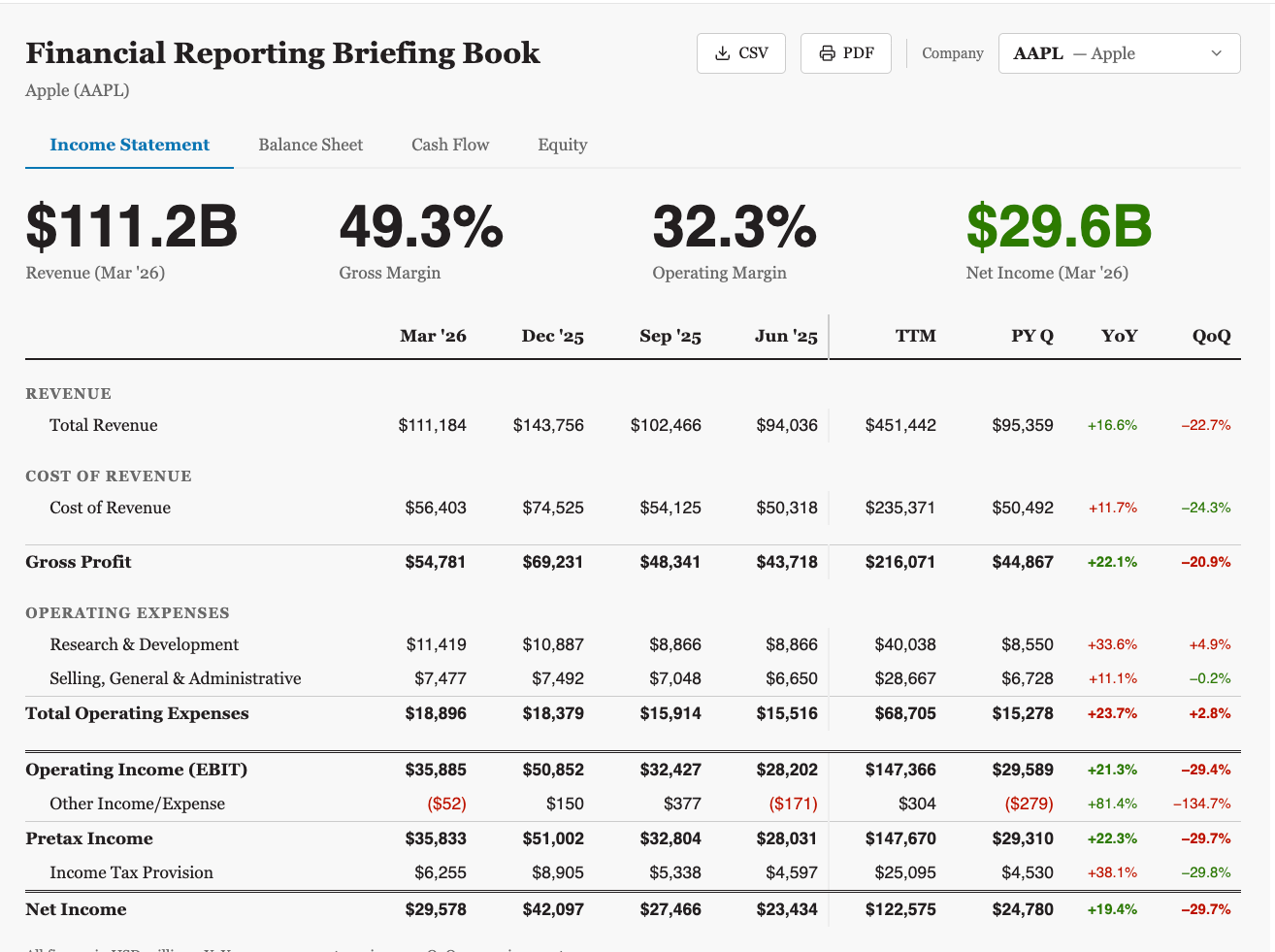
Dives make building analytics with Claude super easy. Try them out for free at motherduck.com.